Read the island before you move

The Isle Cheats

Spot dinosaurs in dense cover with species, growth and stamina ESP. Explore aim assistance, resource markers and radar for Evrima on Windows.

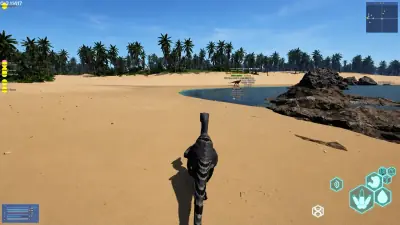
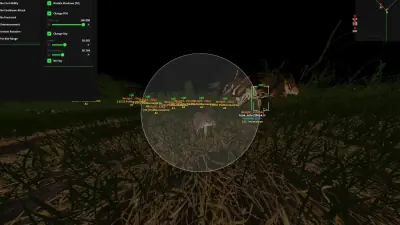
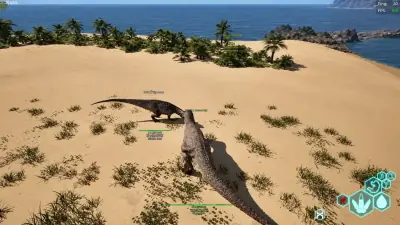
Dinosaur in a grassy valley with colored ESP labels, health bars and a radar overlay.

Evrima

Game branch

10 / 11

Windows

ESP

Species & growth

Cloud DMA

Required layer

Aim assistance
Head dot
Player ESP
Species
Growth
Stamina
Resource ESP
Fullbright
Custom colors
Radar
Panic key
Windows 10 & 11
Evrima only
Cloud DMA required
Intel / AMD
HVCI on
TPM on
Secure Boot on
Aim assistance
Head dot
Player ESP
Species
Growth
Stamina
Resource ESP
Fullbright
Custom colors
Radar
Panic key
Windows 10 & 11
Evrima only
Cloud DMA required
Intel / AMD
HVCI on
TPM on
Secure Boot on

Features

Tools for reading Evrima

Species and growth explain the threat. Resource markers help with the next move. Choose the overlay layers that fit your run.

Dinosaur ESP

Species, growth and stamina.

See which dinosaur is nearby and how far it has grown before you cross its path. Health, stamina and direction add context to each player marker.

  • Player, NPC and animal ESP
  • Species labels
  • Growth readouts
  • Health and stamina
  • Player direction

Resource markers

Find food and water.

Corpse, gore, fruit and water markers help you plan a route through the island. Set a maximum distance to keep nearby resources readable.

  • Corpses
  • Gore
  • Fruit
  • Water

Aim assistance

A reference for close combat.

Aim assistance, a head dot and visible check help you follow a moving dinosaur. Your position, reach and bite timing still matter.

  • Aim assistance
  • Head dot
  • Visible check
  • Crosshair

Health and stamina

Read the animal ahead.

Health and stamina readouts add information to a species label. Use them alongside growth and distance when deciding to approach or move away.

  • Health values
  • Stamina values
  • Growth context
  • Distance labels

Radar

Keep the local picture in view.

Radar complements the world overlay when nearby dinosaurs are spread across your surroundings. Use the menu to choose a view you can read while moving.

  • Nearby dinosaur overview
  • Pairs with world ESP
  • Species context
  • Menu configuration

Fullbright

See more at night.

Fullbright changes the scene lighting for darker areas. A clear view of the ground helps you follow a route while the ESP identifies nearby animals.

  • Lighting control
  • Night visibility
  • Terrain awareness
  • Independent menu option

Overlay controls

Keep the island readable.

Choose boxes, snaplines, names and distances to suit the scene. Maximum distance controls limit the number of markers competing for attention.

  • Boxes
  • Snaplines
  • Names
  • Maximum distance

Custom colors

Separate the information you need.

Custom ESP colors let you adjust the overlay against foliage and terrain. Start with the labels you need and add other readouts gradually.

  • Custom ESP colors
  • Readable labels
  • Configurable overlay
  • Separate information layers

Session utilities

Controls within reach.

Set your menu and panic keys, and keep FPS, resolution or time visible when needed. Configurations let you return to a familiar menu layout.

  • Menu key
  • Panic key
  • FPS and time
  • Saveable configs

Store

Our products

Compare the cheat menu and the utilities on this grid. Open a product page for the feature list and checkout.

The Isle Cheats

Dinosaur ESP, aim assistance, radar and resource markers for the Evrima branch.

Species, growth and stamina ESP with aim assistance, radar, resource markers and fullbright.

  • Dinosaur ESP
  • Species & growth
  • Aim assistance

HWID Spoofer

Refresh disk, network and GPU identifiers with the bundled trace cleaner. Check support for your particular hardware restriction.

A separate hardware utility for identifier changes and trace cleanup. It does not lift an account sanction or guarantee access to The Isle.

  • Disk serial rewrite
  • MAC rewrite
  • GPU ID rewrite

Cloud DMA

A Hyper-V environment for one Windows PC with guided installation and encrypted activation.

A required setup layer for full cheat functionality. Review Hyper-V support and the separate GREENWARD, Static Server and AWS purchases.

  • Single-PC setup
  • Guided Hyper-V installation
  • Encrypted activation

Skin Changer

A separate cosmetic client with a supported-title list. Local previews do not add tradable inventory items.

Preview supported cosmetic options locally. Ask support to confirm the supported titles; this page does not promise The Isle cosmetic compatibility.

  • Weapon finish looks
  • Outfit looks
  • Knife style looks

Why us

Know what you are buying for Evrima

Compare the listed features, Windows requirements and setup layers before checkout. Availability and provider policies can change.

  • Species and growth ESP

    Identify nearby dinosaurs and read their growth alongside health, stamina and distance.

  • Aim assistance

    A head dot and visible check accompany the aim tools for close-range encounters.

  • Food and water markers

    Corpse, gore, fruit and water markers bring resource information into the overlay.

  • Overlay configuration

    Adjust colors, marker distance, boxes and snaplines to reduce clutter in dense vegetation.

  • Published requirements

    Evrima on Windows 10 or 11, with the listed security settings enabled and Cloud DMA for full functionality.

  • Setup and order support

    Use the support page for installation instructions, order help and compatibility questions.

Evrima

Supported branch

This product is listed for Evrima. Legacy compatibility is not included.

10 / 11

Windows versions

Check HVCI, Core Isolation, TPM and Secure Boot before setup.

Cloud DMA

Required infrastructure

Review its separate license and dependencies before buying the cheat.

Setup guide

Prepare your PC for Evrima

Check the game branch and Windows requirements before purchase. Use the delivery instructions for your order to install and configure the software.

  1. Check the branch and setup layers

  2. Follow your delivery instructions

  3. Configure a readable overlay

How it works

From requirements to a readable overlay.

Check the branch and dependencies, follow delivery instructions and configure the information you need.

4 easy steps

  1. 01

    Confirm Evrima

    This product targets the Evrima branch. Check compatibility with the current game build through support.

  2. 02

    Review the setup layers

    Windows security settings and Cloud DMA matter. Review the separate infrastructure purchases before checkout.

  3. 03

    Follow the order instructions

    External checkout provides the current access terms. Open the support documentation if an installation step is unclear.

  4. 04

    Configure the overlay

    Start with species and growth, limit marker distance and save a config that stays readable in foliage.

Blog

Evrima articles and setup notes

Articles about Evrima ESP, aim assistance, setup and compatibility.

An account ban costs a dinosaur. A hardware ban costs the machine. Run the test, then follow the clean, spoof and reboot sequence.

Evrima patches often. Here is the order that separates a patch problem from a machine problem, and the checks that rule each one out.

Evrima's skin system is deep and the editor is slow. Saved presets put the look on in one click, and it is client side like every cosmetic tool.

FAQ

Questions about this page

Answers for this page. The FAQ page holds the rest.